


The landscape of corporate finance is shifting rapidly. The days of having internal systems are behind for large businesses and are being replaced by agile, scalable and highly automated systems. Choosing the ideal cloud accounting solution for business in 2026 is no longer about just keeping a book; it’s about using real-time data to help your company grow globally.
From multi-entity setups to high-volume transactions, choosing the right cloud accounting software for a large business is a critical choice for C-suite executives. This article explores the top 10 enterprise-ready platforms, examines their capabilities, scalability, and compatibility, and offers insights to help you choose the best platform for your business.
What is cloud accounting software?
Cloud accounting software runs on the vendor’s remote servers and is reached through a browser, rather than installed on machines your IT team maintains. The ledger, the reporting layer and the integrations all sit in one hosted environment, so finance, operations and leadership work from the same live numbers instead of emailed exports.
For a large business the distinction matters most at consolidation. On-premise systems usually hold each entity in a separate install, which pushes intercompany eliminations into spreadsheets at close. Cloud platforms hold every entity in one instance, so group reporting, multi-currency translation and audit trails stay inside the system.
Cloud accounting vs. on-premise ERP at enterprise scale
| Factor | Cloud | On-premise |
|---|---|---|
| Multi-entity close | Continuous, in-system | Spreadsheet eliminations |
| Upgrades | Vendor-managed | Project per release |
| Cost model | Subscription, opex | Licence plus capex |
| Adding an entity | Configuration change | New install |
| Audit trail | Native, always on | Often bolted on |
| Disaster recovery | Included | Your infrastructure |
How we evaluated these platforms
This list is built from Corient’s implementation and month-end delivery work on these platforms for client finance teams, not from vendor marketing material. We weighted five factors: multi-entity and multi-currency handling, close speed at volume, integration depth, total cost including implementation, and how much specialist support the platform needs once live. Every entry was reviewed by a Chartered Accountant on our delivery team and is re-checked each quarter against current vendor releases.
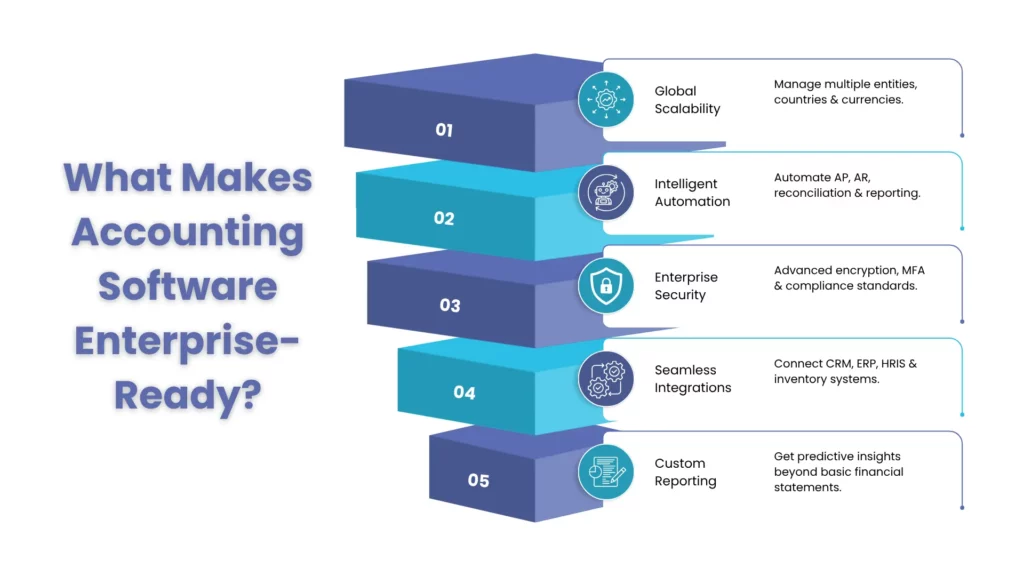
What Makes Accounting Software “Enterprise-Ready”?
For a small business, “accounting” may simply involve keeping track of your expenses and sending out your invoices. The needs of a large organization are much more complicated. It’s an “enterprise-ready” software, which means it will be able to pass the tests of a multi-billion dollar business.
Key Features to Look For:
When evaluating enterprise accounting software, it is always advisable to look for these non-negotiable capabilities:
- Multi-Entity and Multi-Currency Support: Your cloud accounting software should be able to process multiple entities and currencies in real-time into a single view.
- Advanced Automation: You should be able to leverage AI and machine learning for accounts payable (AP), accounts receivable (AR) and bank reconciliation at scale with the help of your accounting software.
- Robust Security and Compliance: Your cloud accounting software must have advanced encryption, multi-factor authentication, and GDPR and SOC2 compliance.
- Open API and Integrations: The accounting software should also be seamlessly integrated with your CRM, HRIS and inventory management software.
- Customizable Reporting: Deep-dive analytics, beyond the standard P&L statement, with predictive insights.
Cloud Accounting Software Comparison at a Glance
| Software | Licence (indicative) | Typical implementation |
|---|---|---|
| NetSuite ERP | Base platform + per-user, annual contract | 6–12 months |
| Sage Intacct | Modular, quoted per entity count | 3–6 months |
| QuickBooks Enterprise | Published per-user tiers + hosting fee | 4–8 weeks |
| MS Dynamics 365 Finance | Published per-user/month list price | 6–9 months |
| Xero | Published per-organisation/month | 2–6 weeks |
| Acumatica | Consumption-based, no per-seat fee | 3–6 months |
| Workday | Quoted on headcount | 9–18 months |
| SAP S/4HANA Cloud | Quoted, highest in this set | 12+ months |
| FreshBooks Advanced | Published per-month + per-user add-on | 1–3 weeks |
| Zoho Books Enterprise | Published per-organisation/month | 2–6 weeks |
The 10 Best Cloud Accounting Software for Large Businesses
Choosing the best cloud accounting software for large sized businesses requires understanding the nuances of each platform. Here is our detailed breakdown for 2026.
1. NetSuite ERP
Best for: Rapidly growing global enterprises needing a unified business management suite.
OneWorld handles subsidiary consolidation well, but saved searches and role permissions are where clients stall. Budget dedicated configuration time before go-live rather than after.
Standout features:
- Global Business Management (OneWorld): NetSuite ERP supports multiple currencies, tax systems, and reporting needs for subsidiaries.
- Real-time Dashboards: It also gives executives a real-time look at KPIs across the whole organization.
Limitation to know:
One of the limitations of NetSuite is its implementation process, which may take a long time and is highly depended on the allocation of specialized consultants.
2. Sage Intacct
Best for: Sage Intacct is best for organizations with complex financial reporting needs and multiple entities.
Dimensional reporting only pays off if the dimension structure is agreed before migration. Reworking dimensions post-launch means restating history.
Standout features:
- Continuous Consolidation: Closes the books faster by automating intercompany eliminations.
- Dimensional Reporting: Tags transactions with “dimensions” (project, location or department, etc.), and allows users to analyze them with more granularity without the need for a large chart of accounts.
Limitation to know:
A disadvantage is that it works well with financials but lacks in certain modules, such as inventory or CRM, which are usually integrated with third parties.
3. QuickBooks (Cloud-Hosted)
Best for: QuickBooks is best for large businesses that want a familiar interface with Business-grade power.
Hosted deployments perform well until concurrent user counts climb. Watch multi-user file locking during close if more than fifteen people are in the ledger.
Standout features:
- Advanced Pricing & Inventory: QuickBooks has highly customizable rules for pricing and warehouse management.
- Industry-Specific Editions: It provides tailored versions for manufacturing, wholesale, and non-profits.
Limitation to know:
Not a “native” cloud application, as with NetSuite, but it will more often than not need a hosting provider to become fully remote.
4. Microsoft Dynamics 365 Finance
Best for: Microsoft Dynamics 365 Finance is best for organizations already deeply integrated into the Microsoft 365 ecosystem.
Teams already on Power BI adopt this fastest. The friction is data model mapping from a legacy chart of accounts, not the interface.
Standout features:
- Predictive Insights: Uses historical data to predict when customers will pay their invoices.
- Deep Integration: Works natively with Excel, Teams and Power BI integration for data manipulation.
Limitation to know:
It can be daunting for users who don’t have a lot of experience with intricate ERP systems.
5. Xero (Enterprise Plan)
Best for: Xero’s Enterprise Plan is best for modern, tech-forward enterprises that prioritize ease of use and a vast integration ecosystem.
Excellent below roughly 5,000 monthly transactions per entity. Above that, reporting slows and clients typically move consolidation into a separate tool.
Standout features:
- Extensive App Store: A wide range of Apps from payroll to industry-specific applications (more than 1,000 integrations).
- Hubdoc Integration: Automated data capture of bills and receipts, minimizing manual data entry.
Limitation to know:
This works well in the mid-market, but can be a problem in the very high transaction volume world of Fortune 500 businesses.
6. Acumatica
Best for: Acumatica is best for businesses looking for a flexible, modern ERP with a unique pricing model.
Consumption pricing suits seasonal businesses, but it makes annual budgeting harder. Model your peak month, not your average.
Standout features:
- Consumption-Based Pricing: Pricing on what the user consumes, not by user, is ideal for companies with a large number of “occasional users”.
- Future-Proof Platform: Designed to be custom developed and integrated easily on an open architecture.
Limitation to know:
The total cost of ownership can be unpredictable due to the resource-based pricing model.
7. Workday Financial Management
Best for: Workday Financial Management is best for large enterprises that want to unify their people and their money on one platform.
The finance and HR single data core is real, and so is the change management load. Plan for parallel running across two close cycles.
Standout features:
- Single Data Core: Finance and HR data live in the same place, allowing for incredible insights into workforce costs.
- Strategic Sourcing: Advanced tools for procurement and spend management.
Limitation to know:
It is a massive system that requires significant organizational change management to implement successfully.
8. SAP S/4HANA Cloud
Best for: SAP S/4Hana Cloud is best for the world’s largest global conglomerates requiring the highest level of complexity.
Justified where statutory reporting spans many jurisdictions. Below that threshold, clients pay for complexity they never use.
Standout features:
- In-Memory Database: Allows for lightning-fast processing of massive amounts of transactional data.
- Embedded AI: Automates routine tasks and identifies anomalies in financial patterns automatically.
Limitation to know:
It is arguably the most expensive and complex solution on the market.
9. FreshBooks Advanced
Best for: FreshBooks is best for large-scale service-based businesses that need robust project accounting.
Strong for retainer and project billing. Inventory-carrying businesses outgrow it quickly and end up bridging to another ledger.
Standout features:
Project Profitability Tools: Tracks every billable hour and expense against specific project margins.
Retainer Management: Streamlines the billing process for ongoing client relationships.
Limitation to know:
It lacks the deep manufacturing and inventory features found in full ERPs like NetSuite or SAP.
10. Zoho Books (Enterprise)
Best for: Zoho Books is best for businesses looking for a comprehensive, affordable suite that scales with them.
Deluge custom functions cover a surprising amount of workflow. Support response times are the trade-off when close is time-critical.
Standout features:
- Custom Functions: Develop very specific automation workflows with Deluge script.
- Client Portal: A professional-level portal for clients to access to see invoices, pay bills, and monitor progress on projects.
Limitation to know:
In some instances, support may take longer compared to dedicated premium business vendors.
How to Choose the Right Platform for Your Business
Selecting cloud accounting software is a long-term commitment. You aren’t just buying a tool for today; you are investing in a foundation for the next decade.
Questions to Ask Before You Decide
Before signing a contract, your finance team should ask:
- Does it scale? Can it handle 5x our current transaction volume?
- What is the integration cost? It’s not just the software cost, but the cost of making it talk to your other systems.
- Is the reporting truly “real-time”? Or is there a lag in data processing?
- What is the user adoption curve? Is it intuitive, or will my team need three months of training?
- How often are updates pushed? Native cloud apps should update automatically without breaking your customizations.
When to Consider a Full Cloud ERP vs. Standalone Accounting Software
For many large businesses, the line between “accounting software” and a “Full Cloud ERP” is blurred.
- Standalone Accounting: If you need accounting only and are satisfied with other “best-of-breed” systems such as HR, sales and inventory.
- Full Cloud ERP: If you are experiencing “data silos” (differing numbers from your sales team and finance team), then this is the right solution for you. The ERP offers a “single version of the truth” throughout the whole enterprise.
Beyond Software: Why Enterprises Need Cloud Accounting Expertise
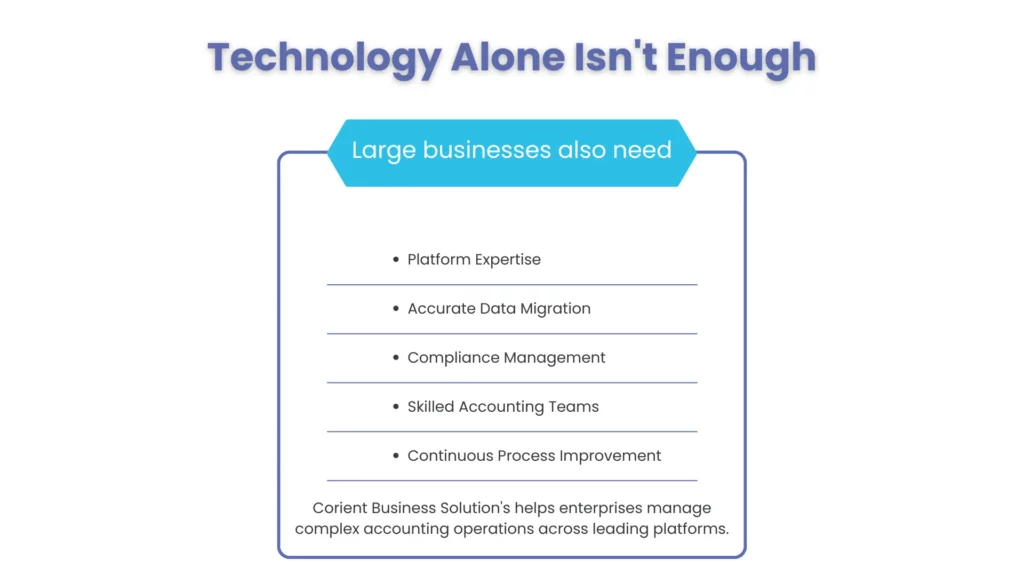
Choosing the right cloud-based accounting solution is only the first step for large businesses. The real challenge lies in successful implementation, data migration, compliance management, system integration, and scaling financial operations as the business grows. Enterprises need more than just accounting software,they need the right expertise, processes, and support to maximize their technology investment.
Corient helps businesses optimize their cloud accounting environment by providing accounting expertise, platform knowledge, and ongoing financial support. This enables finance teams to improve efficiency, maintain accuracy, and focus on strategic decision-making while leveraging the capabilities of modern accounting platforms.
Platform-Agnostic Expertise
One of the primary challenges in cloud accounting adoption is having the right expertise to configure, manage, and optimize financial platforms. Each system requires specialized knowledge to ensure accurate implementation, smooth workflows, and effective reporting. Corient’s team works across leading cloud accounting and ERP platforms, including:
- Enterprise ERP Platforms: NetSuite ERP, SAP S/4HANA Cloud, Microsoft Dynamics 365 Finance
- Cloud Accounting Platforms: Sage Intacct, QuickBooks Enterprise, Xero Enterprise, and Zoho Books
- Industry-Specific & Scalable Platforms: Acumatica, Workday Financial Management, and FreshBooks Advanced
By partnering with Corient, your business gains access to a team that is already proficient in these high-level tools, eliminating the need for expensive, time-consuming internal training.
Cloud Accounting Support: Internal Teams vs. Expert Accounting Services
For many large-scale enterprises, the “Total Cost of Ownership” of accounting software isn’t just the subscription fee; it’s the cost of the experts required to run it. Corient allows companies to shift from a fixed-cost internal model to a flexible outsourcing model. Working with an experienced accounting services provider helps businesses access specialized expertise without increasing internal complexity.
Key advantages of outsourcing your books to Corient include:
- Eliminating Software Overhead: You don’t have to deal with complicated multi-user licenses and technical support for cloud accounting software for business, Corient does it for you with the most efficient tools on the market.
- Scalability on Demand: Large companies often have unpredictable transaction volumes. Corient’s outsourcing model scales with you, they can provide the manpower required to close the books at the end of the month or for more complex consolidations, without adding additional full-time employees.
- Focus Finance Teams on Strategic Priorities: By reducing repetitive accounting workloads, internal finance leaders can dedicate more time to forecasting, analysis, and strategic business decisions.
Practical Guidance for Decision Makers
If you are currently at a crossroads, follow this three-step action plan:
- Audit Your Current Pain Points: Is the problem speed, accuracy, or visibility?
- Define Your “Must-Haves” vs. “Nice-to-Haves”: Don’t pay for an SAP-level system if a Sage Intacct-level system solves 99% of your problems.
- Request a Proof of Concept (POC): Don’t just look at a demo. Have the vendor run a small set of your actual data through the system to see how it performs under your specific constraints.
Ready to Optimize Your Enterprise Accounting Operations? Partner with Corient for scalable finance & accounting solutions.
People Also Ask:
Is cloud accounting secure enough for large businesses?
Yes. The modern cloud accounting software providers are sophisticated enough to have bank-level encryption, and security compliance certifications (SOC 1/2, GDPR) that are often more advanced than those of a small in-house IT department.
How long does it take to implement enterprise accounting software?
Implementation may take from three months to a year, depending on complexity. For a standalone solution, it could take weeks, with a complete ERP solution, such as SAP or NetSuite, taking nearly a year.
Can these systems handle multi-country tax compliance?
Most enterprise-level systems (like NetSuite OneWorld or SAP) have built-in tax engines that automatically adjust for VAT, GST, and local regulations in hundreds of countries.
What is the average cost of these platforms?
Pricing is typically custom for large businesses. It usually involves a base subscription fee plus costs per user or per transaction volume. Expect to invest anywhere from $10,000 to $100,000+ annually.
Do I need an external consultant for implementation?
For most cloud ERP financial management systems, yes. An implementation partner ensures that the software is configured to your specific business processes and that your data is migrated accurately.
Conclusion
The year 2026 demands that large businesses be more agile than ever. Moving to the best cloud accounting software for large businesses is no longer a luxury; it is a strategic necessity for survival and growth. Whether you choose the sheer power of SAP S/4HANA, the financial precision of Sage Intacct, or the ecosystem flexibility of NetSuite, the goal remains the same: transforming your finance department from a back-office function into a strategic engine for the enterprise.
Partnering for Global Growth
Whether you are navigating the multi-currency requirements of NetSuite OneWorld or the dimensional reporting of Sage Intacct, Corient’s capability to handle complex books across these platforms ensures that your financial “nervous system” remains robust.
Ready to streamline your operations? Instead of just investing in software, invest in a partnership. Contact Corient today to learn how our outsourcing solutions can manage your books on any platform, allowing you to focus on what matters most, scaling your enterprise.