


One fine morning, you are going through your spreadsheets and in for a rude shock! The numbers do not match, accounts receivable look inflated, and accounts payable haven’t reconciled. It’s the same story across multiple businesses based in the USA.
In 2026, manual errors and reporting delays are becoming a big operational risk. With pressure from the SEC, IRS, and GAAP compliance increases, the old ways of relying on spreadsheets are no longer feasible.
That’s where financial reporting tools have to step in – they’re not just a choice, but a must-have. Let’s take a look at what they are, what to look for, and the 10 financial reporting tools that are really making waves in 2026 when it comes to speeding up, simplifying, and really making sense of your financial reporting.
What are these Financial Reporting Tools all about?
Financial reporting tools are software programs that grab data from all sorts of different places, make sense of it, and then serve it up in useful reports like cash flow statements, income statements, and balance sheets.
Most reporting tools can do a bunch of other stuff too – budgeting, forecasting, modelling, and financial planning & analysis – all the things that make your financial reports quicker, cheaper, and more reliable to create.
According to a study that McKinsey did, it reckons by 2030, organizations could be saving around $125 billion just by automating their finance & accounting work. Having financial reporting tools on your side will definitely help you make some of that savings.
Key Features To Look For In Financial Reporting Tools
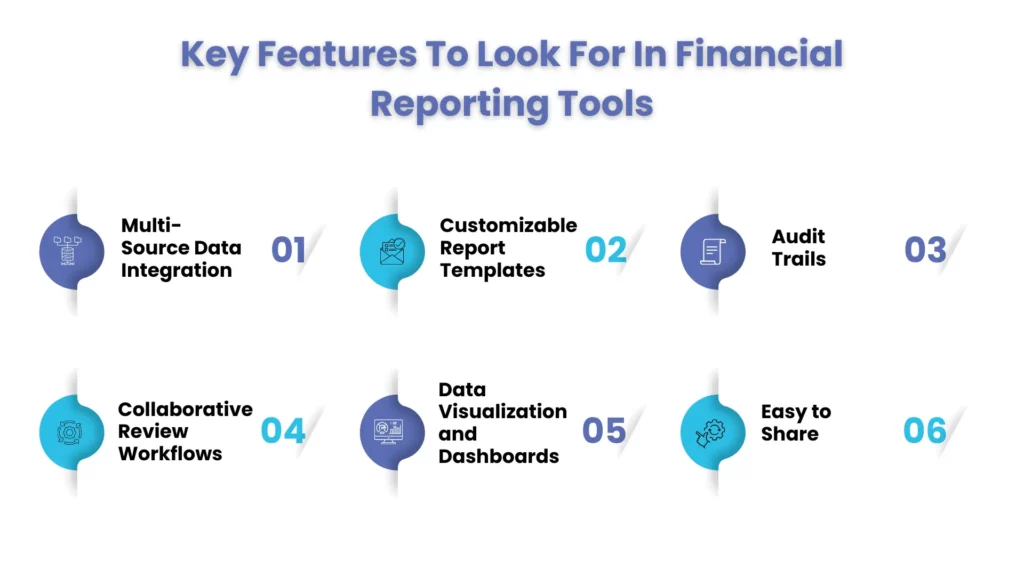
Every financial reporting tool has its unique features/capabilities, some of them non-negotiable. Therefore, while searching for an ideal reporting tool select the one whose features gives you the maximum benefits. The following features represent the core functionalities that deliver the most value for growing businesses:
- Multi-Source Data Integration: The reporting tool must seamlessly integrate with your other business applications to extract financial data automatically. This reduces the chances of manual errors during transfers and keeps your financial reports up-to-date.
- Customizable Report Templates: Seek a reporting tool that gives you the option to create and select report templates that will meet your needs. Templates will save your report-making time, and customization or creation will allow you to adapt the reports as your requirements change.
- Audit Trails: The reporting software must keep a record of every change made in the financial data and when those changes were made. Such records will benefit during financial audits and in identifying discrepancies.
- Collaborative Review Workflows: The ability of the tool to route the reports through approval chains so that everyone is aligned during the process is a must-have feature. This feature will reduce a lot of back and forth and confusion.
- Data Visualization and Dashboards: The financial report, which contains financial statements, will be accessed by your stakeholders who lack deep financial understanding. Therefore, select a reporting tool that creates these reports using interactive charts and graphs, making financial data more accessible. Visual formats help in better understanding the performance.
- Easy to Share: Select the platform that can export reports in multiple formats securely to your stakeholders. This ensures transparency and access to information in an easy-to-read format.
Top 10 Financial Reporting Tools in 2026
1.CloudZero
CloudZero is perfect for SaaS and cloud-driven companies struggling to get a grip on their cloud costs. It seamlessly hooks up financial data with engineering usage so businesses can figure out exactly how profitable each product is. While it isn’t specifically designed for GAAP reporting, it really shines when it comes to cost intelligence and tracking margins.
2.Maxio
Maxio is geared towards SaaS and subscription-based finance teams who want to simplify their revenue recognition, billing and subscription analysis. For companies constantly dealing with recurring revenue, Maxio helps keep on top of compliance and accuracy in reporting.
3.QuickBooks Online
QuickBooks Online still tops the list for small to mid-sized businesses in the USA. It provides what you need in terms of reliable reporting – easy to set up and dashboards that don’t take a rocket scientist to read. It’s perfect for companies that want financial reports that are IRS-ready, in a nutshell.
For Example, A retail chain with 20 different locations on the books made the switch to QuickBooks Online. This change allowed them to centralize all their sales and tax reports, making life easier when it came to dealing with the IRS as well as keeping a handle on cash flow.
4.Xero
Xero’s the go-to for many growing SMBs who love its clean and simple interface plus real-time reporting. It’s got customisable financial statements and loads of integrations with third party apps. Although some advanced reporting features do need add-ons, it’s super easy to scale.
5.NetSuite
NetSuite is a bit more comprehensive as a whole – it’s a full-scale ERP platform ideal for businesses looking to integrate accounting, inventory, CRM and reporting all in one. Plus, it’s a great choice for multi-entity organisations where strong GAAP compliance support is a must have.
6.Workday
Workday is built with large enterprises in mind – it’s all about giving them the financial analytics and workforce reporting they need. It’s got some fantastic dashboards and automation capabilities on offer. Only downside is that implementation can be a bit of a challenge, but when it’s all said and done it pays off in terms of enterprise-level insights.
For Example, A 5000+ employee healthcare group used Workday to bring their financial and HR data into one place, cutting the time it took for them to get reports down by a whopping 40%. The icing on the cake was real-time dashboards that gave them instant access to the information they needed.
7.Vena Solutions
Vena Solutions brings together Excel familiarity with enterprise-grade FP&A features in one tidy package. It’s the perfect solution for finance teams who want all the benefits of structured reporting without having to ditch their spreadsheets. And as an added bonus it supports budgeting, forecasting and close process automation.
8.Drivetrain
Drivetrain is pitching itself as a go-to for startups and SaaS companies looking for robust forecasting tools that also tie in with their business growth goals. It’s all about making sure financial planning aligns with your actual business metrics. Just a word of warning – it’s not a full accounting platform, but it should still give you a pretty solid edge.
9.MosaicTech
MosaicTech is built with strategic finance teams in mind, specifically those who want to use KPIs to drive their financial reporting. It can take financial data and turn it into board-ready insights and slick performance dashboards that everyone can understand. Just one thing – you need to have clean and structured data to get the most out of it.
10.Planful
Planful’s built for automating those long and complicated close cycles – and let’s face it, nobody likes having to wait ages for their financial reports. It supports multi-entity consolidation and advanced financial planning, plus it’s pretty good at getting results faster for growing enterprises. Just be warned – it’s got a bit of a learning curve, but for those who stick with it, it’s a real game-changer.
Top Financial Reporting Tools: Quick Comparison (Pros & cons)
| Software | Best For | Pros | Cons |
| CloudZero | SaaS cost reporting | Deep cloud cost visibility | Limited GAAP reporting |
| Maxio | SaaS finance teams | Strong revenue recognition | SaaS-focused only |
| QuickBooks Online | SMBs | Easy setup, IRS-ready | Limited scalability |
| Xero | Growing SMBs | Clean dashboards | Advanced reporting requires add-ons |
| NetSuite | Mid-market & enterprise | End-to-end ERP | Higher cost |
| Workday | Large enterprises | Advanced analytics | Complex implementation |
| Vena Solutions | FP&A teams | Excel-friendly | Not transaction-level |
| Drivetrain | Startups & SaaS | Strong forecasting | Limited accounting depth |
| MosaicTech | Strategic finance | KPI-driven insights | Needs clean data |
| Planful | Complex close cycles | Fast close automation | Learning curve |
What Features Should I Look For In Financial Reporting Programs?
A US-based business closes its books in 18 days every month. Their accounts receivable aging didn’t tie out, accounts payable accruals were manual, and leadership never trusted the numbers. After using reporting tools that features order-to-cash and procure-to-pay processes, they:
- Cut the close time to 8 days
- Reduced accounts receivable disputes by 22%
- Delivered board-ready reports automatically
The tool didn’t just show numbers, it explained them.
For Example, A US business made a real leap forward with its accounts when it used multi-source data integration to get its AR and AP data talking to each other smoothly, automatically syncing the two. That cut its reconciliation time by a impressive 30%, and nipped errors in the bud by 15%.
How Do Reporting Tools Improve Financial Data Analysis?
While the primary work of financial reporting tools is to generate financial reports, it now does more than that. A well-designed platform will convert raw data into valuable insights, allowing you to make quick, informed decisions with confidence. No wonder, according to Gartner, organizations using advanced reporting tools are 2.5x more likely to make faster strategic decisions.
Here’s how modern financial reporting tools enhance financial data analysis:
Highlight Trends Instead of Raw Totals
Previous versions of financial reporting tools were used only to throw numbers, which were difficult to understand and even more difficult to get an insight into. Modern reporting tools, however, spot patterns and trends in your data over time.
For example, instead of showing $100,000 last quarter, these tools can compare that figure to previous periods, flagging significant growth or decline trends. By highlighting these data, financial reporting tools will help you in identifying:
- Seasonal fluctuations in revenue
- A decrease in margins due to rising costs
- Increased spending in a specific department over time
Flag Anomalies in AR/AP Automatically
There are two major pain points in financial management: accounts receivable and accounts payable. It’s easy to slip up in this process, and when that happens it can lead to all sorts of problems – delayed payments, cash flow issues, the whole works. Financial reporting tools can automate the process of hunting down discrepancies in your payable and receivable data – which is a big time-saver. For example, if a customer is running late on a payment, or if you’ve got an invoice that’s missing some key details, your reporting tool will be on the case :
- send out some reminders before things get out of hand
- weed out duplicate invoices – that just wastes time and resources
- flag up the accounts that are being really unusual with their payment histories That sort of thing reduces the likelihood of human error, and lets you take proactive steps to avoid delays in payment.
Going from Static Budgets to Rolling Forecasts
Remember when your budgets used to be rigid, static affairs – one size fits all, year in year out? Those days are behind us now. Modern financial reporting tools can give you rolling forecasts that adjust your financial projections in real-time, based on the very latest data. That means you can navigate uncertainty and react to changes as soon as they happen, which gives you a big advantage over companies stuck with outdated budget models.
Making Cash-flow Predictability a Reality
Keeping track of your cash flow is a must for any business – but it’s not always easy. If you run out of cash, you can miss out on opportunities, get behind on payments, or even go under. Financial reporting tools help by bringing together data from your accounts receivable (AR) and accounts payable (AP) as well as your bank statements, giving you a clearer picture of where you stand.
They can do things like:
- highlight when money is coming in and going out based on what your customers are promising to pay, and what history tells you
- help you plan your working capital better
- show you when you’re running a cash deficit, so you can adjust your strategy on the fly..
How to Choose the Right Financial Reporting Software Solution
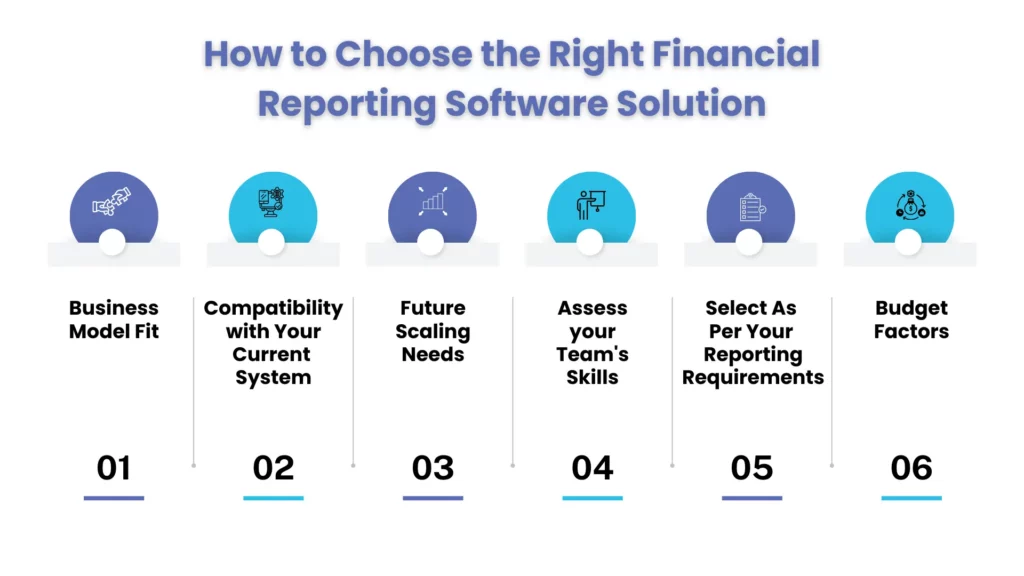
By now, you must have realized how crucial it is to get the right financial reporting tool, after taking your business size, model, and reporting complexity into consideration. To make your choosing task easier, we have listed down some factors that must be considered.:
- Business Model Fit: If you are operating a subscription-based business, focus on tools that have built-in support for recurring revenue. Many basic accounting platforms will handle simple reporting, but for subscription-based needs, they need workarounds.
- Compatibility with Your Current System: Give preference to those tools that will easily integrate with your system. Through smooth integration, you will be avoiding a lot of manual data entry, which is prone to errors.
- Future Scaling Needs: Think about where your business will be in the future and accordingly invest in your tools. Right now, you might think that your current software is handling your 100 employees perfectly, but what will happen when you expand to 500 employees in 5 years? Pick a platform that can scale with your transaction volume and reporting needs.
- Assess your Team’s Skills: Take your team’s training and skill requirements before getting a reporting tool. Some tools will require specialized training to operate, while others will be deployed faster without much work to do.
- Select As Per Your Reporting Requirements: Don’t make the mistake of buying a reporting tool that does not satisfy your needs. If your need is for basic financial statements, a simple platform will be good. For managing complex revenue rules or multiple entities, select a software that addresses those challenges.
- Budget Factors: Take the cost of subscription and setup before buying a financial reporting tool. Some tools are available on a monthly fee, but some are expensive due to the specialized work they do and the implementation cost.
- The ideal financial reporting tool should minimize manual work, boost accuracy, and free up your team for analysis.
People Also Ask
What are financial reporting tools?
Financial reporting tools are software that collect data from multiple sources, process it, and present the financial data in reports such as cash flow statements, income statements, and balance sheets.
Can you recommend top reporting software for financial statements?
QuickBooks online, NetSuite, and Planful are some of the strong contenders, but choose according to your business size and complexity.
What are the best financial reporting software options for small businesses?
QuickBooks Online and Xero offer affordable, GAAP-ready reporting for small businesses.
Conclusion
Financial reporting tools are transforming how businesses account for, manage AR/AP, and the financial close process. However, choosing your financial reporting software is not an easy task, but when doing so, focus on the objectives that matter to your business. Even then, you cannot ignore the clean data, disciplined processes, and expert oversight.
But – that’s pretty much where we come in at Corient. We don’t just know how to get started with these kind of tools, like Workday and QuickBooks – we also offer all sorts of finance and accounting services. Think financial accounting, reporting and the routine tasks like accounts receivable and accounts payable, and we’ll also do the close support to help turn all that reporting into actual insight.
Don’t allow reporting to give you sleepless nights! Connect with us and move your business forward.