




Shopify accounting is the process of recording, reconciling, and reporting the revenue, fees, refunds, and inventory costs a Shopify store generates, including multi-gateway payouts, COGS, and GST compliance for Indian D2C sellers. Because Shopify settles money in batches across several payment gateways rather than one clean ledger, it demands a different workflow from traditional retail bookkeeping, and is best handled by an ecommerce accountant who already understands these quirks.
India’s e-commerce market crossed US$159 billion in 2026 and is projected to approach US$330 billion by 2031, with 1.5–2.5 million MSMEs now selling online. Much of that growth runs through Shopify stores that started as a founder, a laptop, and a WhatsApp group of first customers. Getting finance and accounting fundamentals right early, before order volume outpaces spreadsheets, is what separates brands that scale cleanly from ones untangling last year’s books every January.
What Makes Shopify Accounting Different From Traditional Accounting
A neighbourhood shop has one till, one bank account, and invoices the owner writes by hand. Shopify doesn’t work like that, not even close. A single order can pass through a payment gateway, a currency conversion, a discount code, a shipping charge, maybe a COD agent, and then annoyingly often a return, all before that money finally shows up in the bank.
There’s also a real gap between running your own Shopify store and selling on a marketplace like Amazon or Flipkart. Marketplaces collect tax at source on every sale they process, because they’re handling payment on behalf of someone else. A standalone Shopify store usually sits outside that rule, since you’re collecting your own money rather than acting as a middleman. Sounds like a small technicality on paper.
In practice it reshapes your whole bookkeeping setup: one less credit to track, but also nobody double-checks your filings for you.
Key Components of Shopify Accounting
Strip away the jargon and a setup that actually holds together in year two comes down to a handful of things:
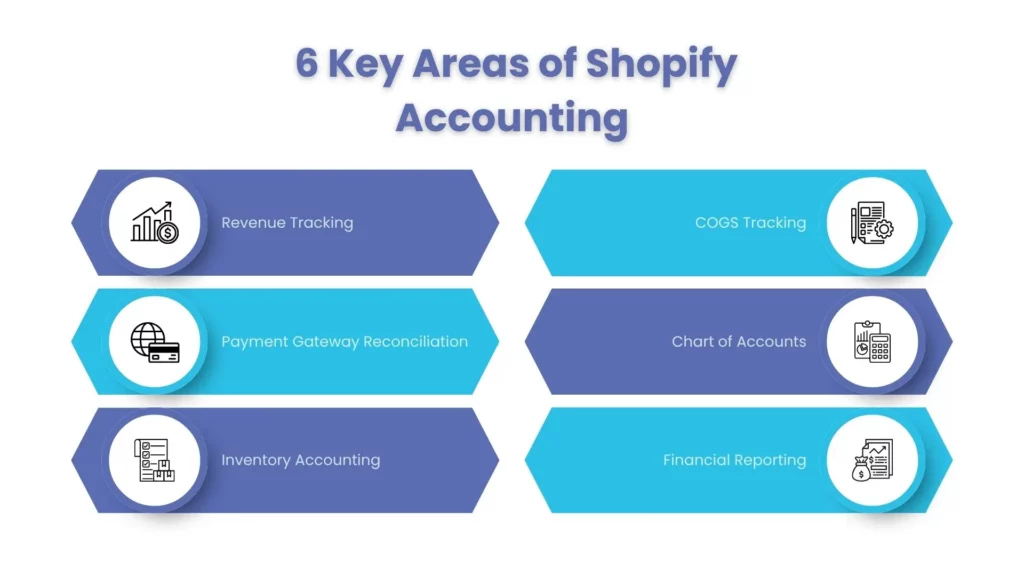
- Revenue recognition: Gross sales, discounts, and refunds need to sit in separate buckets, not get netted into one number that hides what’s really happening.
- Shopify payment gateway reconciliation: Matching what Shopify Payments, Razorpay, PayU, or COD collections show against what actually lands in the bank, payouts come in batches, and almost never same-day.
- Shopify inventory accounting: Valuing inventory using FIFO or weighted-average methods, as appropriate, and reconciling inventory accounting records with the physical stock available in the warehouse.
- Shopify COGS (cost of goods sold): The real cost per product, freight-in and packaging included, not just the number on the supplier’s invoice.
- A Shopify chart of accounts: Platform fees, shipping income, shipping cost, and gateway charges each get a line of their own instead of drowning under “miscellaneous.”
- Shopify financial reporting: A monthly P&L, cash flow, and balance sheet built from reconciled figures, not whatever the Shopify dashboard spits out in a CSV.
Skip any one of these early on and every decision that follows, pricing, cash flow, even a fundraise, gets built on numbers you can’t quite trust.
A Sample Shopify Chart of Accounts
A working chart of accounts separates Gross Sales, Sales Discounts, Sales Returns, Shipping Income, Shipping Expense, Payment Gateway Fees, Shopify Subscription Fee, Shopify App Fees, COGS – Product Cost, COGS – Freight-In, COGS – Packaging, and TCS/TDS Receivable, each on its own ledger line instead of one catch-all “Shopify Income” bucket. This is exactly the structure our ecommerce accountant team sets up during onboarding, so Xero or QuickBooks reports show true per-SKU margin, not a blended guess.
Payout Reconciliation, With Numbers

Take a ₹50,000 sales day: Razorpay’s 2% gateway fee removes ₹1,000, Shopify’s transaction fee takes ₹500, a same-day refund nets out ₹4,000, and a rolling reserve holds back ₹2,500. The bank shows a ₹42,000 deposit three days later.
Nothing is wrong, this is simply what Ecommerce Reconciliation looks like in practice: mapping every deduction back to its own line so ₹8,000 doesn’t look like it vanished.
Common Shopify Accounting Challenges
Ask around and the same handful of headaches keep coming up, almost word for word:
Data scattered across silos: Shopify, the payment gateway, the courier partners, and the bank statement each present a slightly different version of the “same” transaction, making a unified source of truth impossible without automated pipelines.
Payouts decoupled from gross sales: A ₹50,000 sales day quietly becomes a ₹42,000 bank deposit three days later. Once platform transaction fees, statutory deductions (like TDS/TCS), rolling reserves, and processed refunds are netted out, matching deposits to individual orders becomes a nightmare. Nothing is mathematically wrong; it just lacks direct traceability.
Multi-channel visibility blindness: Sellers running Shopify alongside Amazon, Myntra, or Instagram Shopping often cannot determine their true combined revenue or bottom-line profitability without manually consolidating three or four distinct platform reports. This gets worse when Amazon Seller Accounting & Bookkeeping is kept disconnected from Shopify’s books, since each platform settles fees, TCS, and returns on its own schedule.
Setting Up Your Shopify Accounting System
A reliable Ecommerce accounting system that still holds up six months in usually comes down to five things, roughly in this order:
- Pick software that can actually handle Shopify’s volume: Most mid-to-large Indian sellers land on a proper Shopify accounting software setup like Xero or QuickBooks rather than fighting spreadsheets forever.
- Set the integration up properly the first time: A Shopify Xero integration or Shopify QuickBooks integration should map sales, refunds, shipping, and fees to their own ledger lines, not dump everything into one catch-all “Shopify Income.”
- Build a chart of accounts that reflects how money actually moves through the business: gateway fees, COD charges, commissions, and courier costs, each separated from day one.
- Reconcile the bank and gateway on a schedule: weekly if you can manage it, so you’re not doing forensic accounting at month-end.
- Register for GST once you’re required to: Turnover crossing ₹40 lakh for goods (₹20 lakh in special category states) is the usual trigger, and it’s worth checking early rather than backing into it.
Get the integration right at the start, and your Shopify accounting genuinely saves weeks of cleanup work down the line.
Shopify and Sales Tax: What You Need to Know
Shopify sales tax in India just means there’s no separate layer to worry about, since GST absorbed VAT and service tax years back. The one thing worth knowing well is TCS, since it’s where sellers most often trip up.
Under Section 52 of the CGST Act, TCS is meant for marketplace operators like Amazon or Flipkart, who collect payment on behalf of other registered sellers. A standalone Shopify store, where you sell your own goods and take payment directly, generally sits outside that requirement, sellers migrating over from Amazon often carry the old assumption with them, and it’s worth unlearning early.
For GST/VAT compliance more broadly, registration, invoicing, and return filing rest entirely on you once you cross the applicable turnover threshold, since there’s no marketplace operator handling that piece for you.
Shopify App Costs and COGS
Recurring app subscriptions belong in expense tracking, not “miscellaneous”: inventory-sync apps (₹1,500–₹5,000/month), upsell or review apps (₹2,000–₹8,000/month), and accounting-integration apps (₹3,000–₹10,000/month) quietly erode per-order profitability if left untracked. Good accounting practice bakes these into COGS review, not year-end cleanup.
In-House vs. Outsourced Shopify Accounting
Sooner or later, every growing Shopify business runs into this decision, usually around the same time the founder starts losing sleep over it.
| Factor | In-House Team | Outsourced Accounting |
| Setup speed | Slow hiring and training take real time | Fast, specialists can usually start within days |
| Platform expertise | Only as good as whoever you hire | Comes with genuine Shopify accounting software experience |
| Cost predictability | Fixed salaries, whether it’s a slow month or a busy one | Scales up and down with transaction volume |
| Compliance risk | Rests on one person’s knowledge | Backed by a firm’s processes and checks |
| Multi-channel scalability | New hires needed for each channel added | Already built for multi-channel workflows |
Cost comparison
An in-house accountant in a mid-sized Indian city runs roughly ₹35,000–₹70,000 a month once PF, insurance, and software are thrown in, often ₹6–10 lakh a year before you’ve bought a single extra tool. Outsourced Shopify accounting is usually billed by transaction volume or a flat retainer, and it tends to land 30–50% cheaper for comparable accuracy, mostly because the provider has already paid for the software and built the integrations you’d otherwise be assembling from scratch.
Time and expertise trade-offs
Hand it to an in-house hire and they’ll spend a few weeks just learning Shopify’s payout quirks and the reconciliation habits that come with e-commerce.
A Shopify accountant who’s already done this across a dozen other clients skips that curve entirely, faster monthly closes, fewer “wait, why doesn’t this match” conversations.
When to hire a Shopify-specialized accountant
Past ₹1 crore in annual revenue, selling across more than one channel, shipping internationally, or watching your books consistently fall behind, that’s roughly the point where general bookkeeping help stops cutting it, and a dedicated Shopify accountant starts earning their keep. Established Ecommerce Accounting Firms bring playbooks built across dozens of similar stores, so you skip the learning curve entirely.
Best Practices for Accurate Shopify Bookkeeping
- Reconcile payouts weekly, not at month-end. Waiting only gives small errors more time to multiply.
- Track COGS per SKU (Stock Keeping Unit), not as one rough blanket percentage, or you’re guessing at which products are actually worth pushing.
- Automate your Shopify accounting integration instead of exporting CSVs by hand every single week.
- Give every fee its own line. Gateway charges, subscription fees, app costs, and shipping all deserve to be separated out.
- Keep ecommerce accounting for Shopify separate from any other channel you sell on, so nothing gets double-counted or missed.
- Check inventory monthly so shrinkage or unsynced counts get caught before they distort your cost of goods sold.
None of this is glamorous work. But consistent Shopify bookkeeping is usually the difference between a brand that scales without much drama and one that spends every January untangling last year’s mess.
How Good Shopify Accounting Improves Business Decisions
Clean accounting does more than keep the books tidy, it changes what you’re actually able to see in the business. With COGS tracked per SKU, you know almost immediately which products deserve more ad spend and which are quietly bleeding money. With reconciliation kept current, you know your real cash position instead of guessing off a dashboard that only ever shows gross sales, not what’s sitting in the bank.
Investors and lenders look for the same thing: reconciled, audit-ready Shopify financial reporting, not a spreadsheet exported the night before a meeting. Good Shopify accounting, done consistently, stops being a compliance chore and turns into something you actually rely on for pricing calls, inventory bets, and knowing when you’re genuinely ready to raise.
FAQs: Frequently Ask Questions
Do I need registration to sell on Shopify in India?
Yes, once turnover crosses ₹40 lakh for goods (₹20 lakh in special category states) in a financial year, registration becomes mandatory. It also kicks in immediately, regardless of turnover, once you make inter-state taxable supplies, a detail many first-time sellers discover only after their first order ships out of state.
How often should I reconcile my Shopify bookkeeping?
Weekly, ideally, rather than waiting for month-end. Payouts arrive batched and a few days delayed, so a weekly habit catches gateway fee mismatches, refund errors, and missing orders while they’re still small enough to fix in minutes instead of hours of digging through old statements.
Which accounting software works best with Shopify?
Xero and QuickBooks lead by a wide margin among Indian Shopify sellers, mostly because their integration apps have matured enough that sales, refunds, discounts, and gateway fees sync automatically without much babysitting. Tally still works fine for smaller stores, though it usually needs a dedicated connector app to talk to Shopify properly.
How is Shopify COGS calculated correctly?
Add up the purchase or manufacturing cost, inbound freight, and packaging cost per SKU, not just whatever figure sits on the supplier’s invoice. Many sellers stop there and end up with margins that look healthier on paper than they actually are. Tracking COGS this granularly makes it much easier to spot which products are genuinely worth your attention.
When should I outsource my Shopify accounting?
Somewhere around ₹1 crore in annual revenue tends to be the usual tipping point, though selling across multiple channels or repeatedly falling behind on reconciliation can pull that timeline earlier than expected. At that stage, a specialist who already understands Shopify’s payout cycles generally pays for itself fast, in saved time and far fewer compliance headaches.
Conclusion
Shopify accounting isn’t a smaller, simpler version of traditional bookkeeping, it’s its own discipline, shaped by gateway reconciliation, multi-channel selling, and inventory that moves faster than most spreadsheets can keep up with. Get the fundamentals right: a proper chart of accounts, a Xero or QuickBooks integration set up correctly, and reconciliation you actually stick to, and your books stop being a liability and start being genuinely useful.
Corient Business Solutions works with Indian D2C and Shopify brands on exactly this kind of setup, day in and day out. Talk to our Shopify accounting specialists today and get your books audit-ready before your next filing catches you off guard.